Convert 7Z to ZIP online. Keep the files. Change the container.
7Z is excellent when strong compression matters. The problem usually starts later — when you need to send that archive to someone, upload it somewhere, or open it on a device that handles ZIP more easily.
Xplore's 7Z to ZIP converter opens the 7Z archive, reconstructs its files and folders, and packages them into a standard ZIP. You get the same files in a format that's generally easier to share and use.
How to convert 7Z to ZIP online
There are no compression settings you need to understand first. Choose the archive, start the conversion and let Xplore take care of the format change.
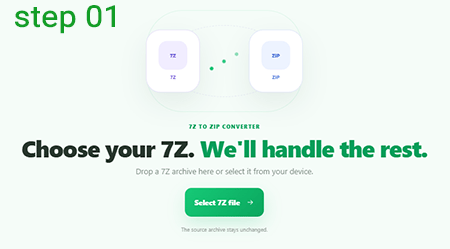
Select the 7Z archive
Drop your .7z file onto the converter or click
Select 7Z file and choose it from your device.
Xplore checks the archive signature before conversion begins.
That helps catch files that have simply been renamed with a
.7z extension even though they are not actually
7Z archives.
Let Xplore open the 7Z archive
A 7Z file is not converted by simply changing its extension. The archive has to be decoded first so the actual files and folders inside it can be reconstructed.
Xplore uses a 7-Zip-compatible WebAssembly engine in the browser to open the source archive before creating the ZIP.
Depending on the archive size, compression method and your device, this stage may take a little longer than opening a normal ZIP.
Enter the password only if the 7Z is protected
If the archive can be opened normally, you won't see an unnecessary password screen.
When protected data requires a password, Xplore asks for the password you already use for that archive and retries the extraction.

Xplore rebuilds the archive as ZIP
Once the 7Z contents are available, the converter creates a new ZIP and adds the extracted files back into their corresponding paths.
If your 7Z contains folders such as
project/assets/images/, those paths are recreated
inside the ZIP instead of flattening everything into one folder.
Nothing inside your documents, images, videos or other files is intentionally converted to another media format. This is an archive conversion.
Check the result and download the ZIP
When conversion finishes, Xplore shows the source size, resulting ZIP size and number of files that were placed inside the new archive.
Don't be surprised if the ZIP is larger than the original 7Z. The two formats can use different compression methods, and 7Z is particularly good at squeezing certain types of data.
Click Download ZIP and you're done.

Why convert a 7Z file to ZIP?
Sometimes the best archive format isn't the one with the smallest file size. It's the one the other person can actually open.
Easier sharing
ZIP is widely recognized by operating systems, file managers, browsers and web services, making it a convenient format when you don't control what device the recipient uses.
No 7-Zip requirement for the recipient
If someone only needs the files, sending a ZIP can avoid asking them to install a dedicated 7Z-capable archive application.
Better web compatibility
Some websites, content-management systems and upload forms explicitly accept ZIP archives while rejecting 7Z files.
Simpler handoff
For client deliveries, school files, project packages and cross-platform sharing, ZIP is often the path of least resistance.
How to convert 7Z to ZIP without 7-Zip
Installing 7-Zip is a perfectly valid way to work with 7Z archives, but it isn't always convenient — especially on a temporary computer, Chromebook, phone or managed work device.
With Xplore, the decoding stage runs through a WebAssembly archive engine in the browser. The extracted files are then rebuilt as a ZIP in the same browser session.
So for a straightforward one-off conversion, the workflow stays: choose the archive, convert it and download the ZIP.
7Z vs ZIP: what's the difference?
Neither format is universally “better.” They optimize for slightly different priorities.
Great when archive efficiency matters
7Z supports methods such as LZMA and LZMA2, solid compression and strong archive encryption. That flexibility can produce excellent compression ratios for suitable data.
Great when easy access matters
ZIP has extremely broad support across consumer devices, operating systems and web applications, which makes it especially practical for sharing.
Will converting 7Z to ZIP make the file smaller?
Not necessarily — and that's an important distinction.
Converting 7Z to ZIP is primarily a compatibility operation, not a promise of stronger compression.
A 7Z archive may use LZMA or LZMA2, solid compression and other techniques that can achieve a strong compression ratio. Repacking the same files into ZIP can therefore produce a larger archive.
If the ZIP grows slightly, the conversion hasn't failed. You're trading some compression efficiency for wider compatibility.
Does converting 7Z to ZIP reduce file quality?
No media transcoding is part of a normal archive conversion.
A JPG inside the 7Z is extracted as that JPG and placed into the ZIP. The same principle applies to documents, source code, video, audio and other files.
The archive compression changes. The actual file is not supposed to become a lower-quality version just because its container changed from 7Z to ZIP.
Are folders preserved when converting 7Z to ZIP?
Yes. The converter reconstructs the source directory tree before creating the ZIP.
That matters for archives containing websites, software projects, backups or any other data where the path of a file is just as important as the file itself.
Convert a password-protected 7Z file to ZIP
7Z supports strong AES-256 encryption, so encrypted archive data cannot simply be ignored during conversion.
If Xplore encounters protected data, enter the correct archive password when prompted. The converter can then retry the decoding stage and continue building the ZIP.
Xplore does not attempt password cracking, guessing or brute-force recovery.
Why won't my 7Z file convert to ZIP?
If a conversion stops, the archive itself is often the best place to start looking.
The file isn't actually a 7Z archive
Changing a filename to .7z does not change its internal format. Xplore checks the real 7Z signature before decoding.
The archive is damaged or incomplete
A missing header, corrupted compressed block or incomplete download can prevent the archive engine from reconstructing the files correctly.
The password is incorrect
Encrypted data cannot be decoded into the ZIP until the correct archive password is supplied.
The archive uses a difficult or unsupported configuration
7Z is a flexible container and can use different compression, filter and encryption combinations. An unusual archive can fail even though its extension is valid.
The device runs out of memory
Browser conversion needs memory for the source archive, extracted contents and ZIP generation. Very large archives can therefore be demanding on phones and low-memory devices.
Can I convert a large 7Z file to ZIP?
There isn't one useful size limit that applies to every device. Browser memory is the practical constraint.
A 500 MB 7Z can represent considerably more than 500 MB once its contents are decompressed. During conversion, the browser may need room for the compressed source, extracted files and the ZIP being generated.
For very large archives, a desktop archive program may therefore be more reliable than browser conversion, particularly on mobile.
Bigger archives can require substantially more working memory than their compressed file size.
Convert 7Z files directly in your browser
This converter is designed so the archive itself is decoded and rebuilt on your device instead of intentionally uploading the 7Z to Xplore's server for conversion.
7Z to ZIP is part of Xplore File Manager , a collection of focused tools for opening, viewing, extracting, converting and managing everyday file formats.
Frequently asked questions about converting 7Z to ZIP
How do I convert a 7Z file to ZIP?
Select your .7z archive, click Convert 7Z to ZIP and wait while Xplore opens the source archive and repackages its contents. When the conversion is complete, download the resulting ZIP.
Can I convert 7Z to ZIP without installing 7-Zip?
Yes. Xplore runs its archive conversion engine in the browser, so installing the desktop 7-Zip application is not required for this conversion.
Will the ZIP contain the same files as the 7Z?
The converter extracts the source archive and places those files into the new ZIP while recreating their directory paths. The goal is to change the archive container, not the files themselves.
Does 7Z to ZIP conversion reduce quality?
Archive conversion does not intentionally transcode images, audio, video or documents. A file extracted from the 7Z is placed into the ZIP as file data rather than converted to a lower-quality media format.
Why is my ZIP larger than the original 7Z?
7Z can use highly efficient compression methods such as LZMA and LZMA2 as well as solid compression. ZIP uses a different archive structure and compression approach, so converting to ZIP can produce a larger file.
Can I convert a password-protected 7Z to ZIP?
If the archive engine requires a password to decode protected data, Xplore can prompt you for the password you already have. The tool does not crack or bypass archive passwords.
Are folders preserved during conversion?
Yes. The converter recreates directory paths inside the ZIP so nested files remain organized rather than being placed into one flat folder.
Is 7Z better than ZIP?
It depends on the job. 7Z is attractive when strong compression and advanced archive features matter. ZIP is often preferable when broad compatibility and easy sharing are more important.
Why can't my 7Z archive be converted?
The archive may be corrupted, incomplete, protected by an incorrect password, use an unsupported configuration or require more memory than the browser currently has available.
Can I convert very large 7Z files?
The practical limit depends on your browser and available device memory. Large 7Z archives can expand substantially during extraction, so very large conversions may work better with a desktop archive program.
Powerful archive in. Easier archive out.
Keep the files and folder structure. Change the format to something that's easier to hand off.
Convert 7Z to ZIP