Clean a ZIP file online. Without digging through every folder yourself.
ZIP archives sometimes contain files you never intentionally added: operating-system metadata, thumbnail databases, Finder leftovers and other hidden clutter.
Xplore ZIP Cleaner scans the archive for you, automatically selects the safest cleanup targets and builds a new clean ZIP while leaving your original archive untouched.
How to clean a ZIP file online
The normal workflow only needs a few clicks. You do not need to manually browse hundreds of files just to remove common archive clutter.
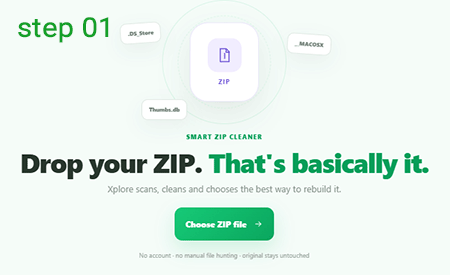
Choose the ZIP file you want to clean
Drag your archive onto ZIP Cleaner or click Choose ZIP file and select it from your device.
Xplore verifies that the file is actually a ZIP archive before
starting the cleanup process. Simply renaming another file to
.zip does not make it a valid ZIP.
Let Smart Scan find unnecessary ZIP files
Xplore opens the archive structure and checks its paths and filenames for known system-generated clutter.
Common examples include macOS metadata such as
__MACOSX and .DS_Store, plus
Windows files such as Thumbs.db and
desktop.ini.
These high-confidence cleanup rules are selected automatically, so most users do not need to configure anything.
Review the ZIP cleanup report — only if you want to
The main cleaner is designed to work without manual file hunting. After scanning, Xplore tells you how many safe cleanup items were detected and how much content they represent.
If you want more control, open See what Xplore found to inspect the exact archive paths before rebuilding the ZIP.
Safe cleanup choices have already been made.
Click Clean & Optimize ZIP
Xplore removes the currently selected cleanup entries and rebuilds the remaining archive as a new ZIP file.
The cleaner can also test different ZIP rebuild strategies instead of assuming that one compression method is always best. The resulting archive size is measured after processing.
Your original ZIP on the device is not edited in place.
Compare the original and cleaned ZIP size
Once rebuilding finishes, the cleaner measures the actual output instead of showing an estimated saving.
You can see the original ZIP size, cleaned ZIP size, difference and number of removed entries before downloading the result.
If the archive was already efficiently compressed, Xplore tells you rather than pretending that a large reduction occurred.

Download the cleaned ZIP file
Click Download cleaned ZIP when the new archive is ready.
Xplore gives the cleaned archive a separate filename, so the original ZIP remains available if you ever need to compare or recover something later.

How to remove __MACOSX from a ZIP file
Archives created on macOS can contain a folder named
__MACOSX. It can store Finder and resource-fork
metadata associated with files in the archive.
That metadata may be useful to macOS itself, but it is often unnecessary when a ZIP is being shared with Windows, Linux, a web server or another system that only needs the actual files.
ZIP Cleaner recognizes entries inside
__MACOSX as a high-confidence cleanup target and
can leave the real project files in place while excluding that
metadata from the rebuilt archive.
How to remove .DS_Store from ZIP files
.DS_Store is a hidden Finder metadata file that can
appear in folders on macOS and later end up inside ZIP archives.
It does not contain the actual documents, images or project files you intended to share. ZIP Cleaner detects these entries by name and excludes them when the cleaned archive is rebuilt.
You do not need to open every folder in the ZIP looking for
individual .DS_Store files.
How to remove Thumbs.db from a ZIP file
Windows can generate files such as Thumbs.db to cache
thumbnail information for folders containing images and other media.
When those folders are zipped, the cache database can travel with the actual files even though the recipient does not need it.
Xplore treats common Windows thumbnail and folder metadata files as safe cleanup candidates so they can be excluded automatically.
What unwanted files can ZIP Cleaner remove?
Not every unusual file should be deleted automatically. Xplore separates high-confidence system clutter from files that require a human decision.
Safe cleanup
These are common system-generated entries that Xplore can select automatically.
-
__MACOSX/ -
.DS_Store -
AppleDouble
._fileentries -
Thumbs.db -
ehthumbs.db -
desktop.ini
Advanced cleanup
These may be unnecessary, but they can also be intentionally included in a project.
-
Temporary files such as
.tmp -
Backup files such as
.bak - Empty folders
- Zero-byte files
Can ZIP Cleaner reduce ZIP file size?
Yes, but the amount depends on what is inside the archive.
Removing unnecessary entries directly reduces the amount of content that needs to remain in the ZIP. Xplore can also rebuild the archive and test whether a fresh ZIP representation is smaller.
However, ZIP Cleaner does not reduce the visual quality of images, transcode videos or rewrite PDF content just to claim a bigger saving.
Text-heavy ZIP
Source code, text, JSON, CSV, XML and other repetitive data can often respond well to ZIP compression.
Media-heavy ZIP
JPG, MP4, MP3 and many PDFs are already compressed internally, so simply putting them through ZIP compression again may save very little.
ZIP Cleaner vs ZIP Compressor
Both may produce a smaller archive, but they solve different problems.
Removes unnecessary archive contents
Best when your ZIP contains system metadata, hidden clutter or entries that should never have been included in the first place.
Scan → remove → rebuildFocuses primarily on reducing size
A compressor generally focuses on stronger recompression or optimization rather than deciding which archive entries are unnecessary.
Compress → rebuild → compareWhy is my ZIP file still large after cleaning?
Cleaning an archive and dramatically compressing its contents are not the same operation.
There was very little junk inside
Removing a few tiny metadata files may make the archive cleaner without noticeably changing its total size.
Most files are already compressed
Photos, video, audio and many PDFs already use their own compression, leaving relatively little for ZIP compression to reduce.
The original ZIP was already efficient
A well-built archive may already use an efficient compression strategy. Rebuilding it does not guarantee a smaller result.
ZIP has container overhead
File names, directory records and other ZIP structures also consume a small amount of space, even after unnecessary files are removed.
Why clean a ZIP file before sharing it?
A clean archive gives the recipient fewer irrelevant files to browse through and reduces the chance that system-specific metadata appears alongside the actual project.
This can be especially useful when transferring files between macOS, Windows and Linux, uploading website packages, sharing assets with clients or sending project folders to another team.
Does ZIP Cleaner change the original ZIP file?
No. The tool reads the source archive and produces a separate cleaned ZIP.
That means you can inspect the result before deciding whether you still need the original archive.
The safest workflow is simple: keep the source ZIP until you have opened or extracted at least one file from the cleaned copy and confirmed that everything you expected is still present.
Clean ZIP files directly in your browser
This ZIP Cleaner is designed to read, clean and rebuild the archive locally in your browser rather than intentionally sending the ZIP to Xplore's server for processing.
ZIP Cleaner is part of Xplore File Manager , a growing collection of focused online tools for opening, extracting, converting, cleaning and managing files.
Frequently asked questions about cleaning ZIP files
What does a ZIP Cleaner do?
A ZIP Cleaner scans an existing ZIP archive for unnecessary entries such as known operating-system metadata, removes the selected entries and creates a new cleaned ZIP without changing the original archive.
How do I remove __MACOSX from a ZIP?
Add the ZIP to Xplore ZIP Cleaner. Entries contained in the __MACOSX metadata folder are recognized by the safe cleanup scan and can be excluded automatically when the new ZIP is built.
Can ZIP Cleaner remove .DS_Store files?
Yes. .DS_Store is included in the cleaner's high-confidence macOS metadata rules and is selected automatically when found inside the archive.
Can I remove Thumbs.db from a ZIP file?
Yes. Xplore detects common Windows metadata such as Thumbs.db, ehthumbs.db and desktop.ini and can remove them when rebuilding the cleaned archive.
Does cleaning a ZIP reduce its file size?
It can. Removing unnecessary files reduces the archive contents, and rebuilding the ZIP may also improve compression in some cases. The exact result depends heavily on what the ZIP contains.
Why didn't my ZIP get much smaller?
The archive may contain very little removable clutter, may already be efficiently compressed, or may mainly contain formats such as JPG, MP4, MP3 or PDF that are already compressed.
Is ZIP Cleaner the same as a ZIP compressor?
No. A ZIP Cleaner primarily removes unnecessary archive entries. A ZIP compressor primarily focuses on reducing size through compression. Xplore ZIP Cleaner also tests archive rebuilding, so there is some overlap between the two jobs.
Will ZIP Cleaner delete .bak files automatically?
No. Backup files may contain important data, so rules for .bak, temporary files, empty folders and zero-byte files are placed under Advanced Cleanup and remain disabled unless you choose to enable them.
Does ZIP Cleaner delete my original archive?
No. Xplore creates a separate cleaned ZIP file. The original archive on your device remains unchanged.
Can I clean a password-protected ZIP?
The current ZIP Cleaner does not rebuild encrypted ZIP archives. Password-protected archives require encryption-aware processing before their contents can be safely rewritten.
Is there a maximum ZIP file size?
Browser-based processing is limited mainly by the available memory and performance of your device. Very large ZIP archives can require significantly more memory while being opened or rebuilt.
Less archive clutter. Almost no effort.
Drop in the ZIP, let Xplore find the obvious junk and download a cleaner copy when it's ready.
Clean a ZIP file