CBZ Reader Online
Open a CBZ and start reading.
The reader shows the pages stored in the CBZ. Use thumbnails to jump ahead, zoom into a panel, or switch to a two-page spread.
Drop a CBZ comic here
Xplore will open the ZIP-based comic archive, detect the pages and turn them into a complete browser comic reader.
Choose CBZ file ZIP-based .CBZ files • JPG, PNG, WebP, GIF and BMP pagesOpening your comic…
Reading the ZIP archive and finding comic pages.
Open and read CBZ comic files directly in your browser
CBZ files are commonly used to package digital comic-book pages into a single archive. Instead of extracting every image into a folder and opening the pages manually, the reader above presents the comic in a dedicated page-by-page reading interface.
Use this online CBZ reader to open a comic archive, browse through its pages, zoom into artwork or small text and move backward or forward through the book without installing a separate comic-reading application.
How to open a CBZ file online
Open the comic archive, let the reader prepare its pages and start reading without manually unpacking the entire CBZ first.
Choose the CBZ comic you want to open
Select the .cbz file from your device. A CBZ typically contains a sequence of image files that represent the pages of the digital comic.
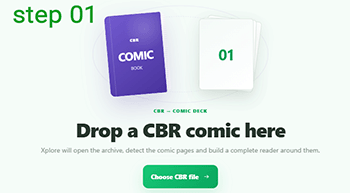
Let the reader detect and prepare the comic pages
The CBZ reader opens the ZIP-based comic archive and works with the supported page images stored inside it. You do not need to extract every page into a separate folder before reading.
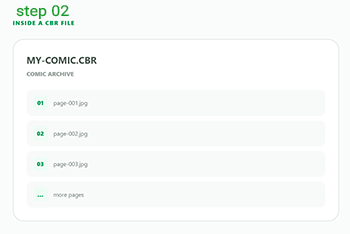
Move through the comic in page order
Once the archive is ready, browse through the available comic pages. The reader treats the images as a page sequence instead of showing them as unrelated files in an archive.
Zoom in on artwork, captions and dialogue
Increase the comic page view when small lettering, speech bubbles or illustrated details need a closer look. Zoom changes how the page is displayed, not the original comic archive.
Navigate backward and forward through the comic
Use the page controls to continue reading, go back to an earlier page or move forward through the book without repeatedly opening separate image files.
The CBZ comic reader is part of Xplore File Manager, where focused browser-based tools are built for viewing, extracting, converting and organizing common file formats without adding unnecessary steps to simple tasks.
What is a CBZ file?
CBZ is a comic-book archive format commonly used for digital comics, manga and scanned books. The file normally contains a series of image files packed inside a ZIP archive and saved with the .cbz extension.
Comic-reading software interprets those images as ordered pages. Instead of displaying a normal archive directory, a CBZ reader turns the collection into a page-by-page reading experience.
Use a CBZ viewer when you want to inspect the comic, not the ZIP
Technically, a CBZ archive is closely related to ZIP. But opening it as an ordinary ZIP and opening it as a comic book are two different experiences.
Comic page order
The reader presents the image files as pages so you can follow the comic naturally.
Page navigation
Move from page to page instead of opening individual archive files one at a time.
Zoom controls
Enlarge page artwork and text when the original comic page contains small visual details.
Reader-focused view
The interface is built around reading the comic rather than managing an archive folder.
One CBZ file can contain an entire sequence of comic pages
In your file manager, a CBZ appears as one archive. Inside it are the page images that make up the comic. The reader bridges those two layers by presenting the archived images as a continuous book.
When an online CBZ reader is useful
Open downloaded comic books
Read a CBZ comic you already have without installing another dedicated desktop reader.
Read manga stored in CBZ
Open manga collections packaged as CBZ files and browse through their page images in sequence.
Inspect a CBZ before organizing it
Quickly check the pages inside an archive and make sure it contains the comic you expected.
Examine scanned artwork
Zoom into scanned comic pages when you need to inspect small dialogue or detailed illustrations.
Why does a CBZ file behave like a ZIP archive?
CBZ is generally a ZIP-based comic-book archive. The archive structure packages the page images together, while the .cbz extension signals that the files should usually be treated as a comic rather than as an ordinary ZIP folder.
That is why a ZIP viewer and a CBZ reader can look at similar underlying content but present it in very different ways.
CBZ vs CBR: what is the difference?
CBR and CBZ are both widely associated with digital comic-book archives. Their main difference is the archive technology used to package the comic pages.
| Feature | CBZ | CBR |
|---|---|---|
| Purpose | Digital comic archive | Digital comic archive |
| Archive family | ZIP-based | RAR-based |
| Extension | .cbz | .cbr |
| Typical content | Ordered image pages | Ordered image pages |
| Reading method | CBZ-compatible comic reader | CBR-compatible comic reader |
Why comic page filenames matter inside a CBZ
Comic archives often rely on filenames to keep pages in a sensible sequence. Names such as 001, 002 and 003 help reader software determine the intended page order.
If the archive has unusual filenames or an unexpected sort order, the page sequence may not match the way the comic was intended to be read.
Renaming a random ZIP file to .cbz does not automatically make it a usable comic
A usable CBZ normally needs image files arranged as comic pages in a sensible sequence. The extension alone cannot turn unrelated ZIP contents into a properly structured digital comic.
Questions about opening and reading CBZ files online
How do I open a CBZ file online?
Choose the CBZ comic file in the reader. Once the supported pages are prepared, browse through them using the available reading and navigation controls.
Can I read CBZ files without installing software?
Yes. An online CBZ reader lets you open supported CBZ comic archives through your browser without installing a dedicated desktop comic reader.
Is the CBZ reader free?
The reader is provided as a free browser-based tool and does not require signup before opening a supported CBZ comic.
What does CBZ stand for?
CBZ is commonly associated with Comic Book ZIP. It typically uses a ZIP archive to package the image files that make up a digital comic.
Is a CBZ file just a ZIP file?
CBZ normally uses ZIP archive technology, but its purpose is more specific. The contents are generally comic page images intended to be displayed in sequence by comic-reader software.
What is the difference between CBZ and CBR?
They serve a similar comic-book purpose but use different archive families. CBZ is generally ZIP-based, while CBR is generally RAR-based.
Can I zoom in on CBZ comic pages?
Yes. Use the available zoom controls when artwork, dialogue or captions need to be viewed at a larger size.
Can I navigate between pages?
Yes. The reading interface allows you to move backward and forward through the available comic pages.
Can I read manga stored as a CBZ file?
If the manga is packaged as a supported CBZ comic archive, it can be opened and viewed page by page like other CBZ comics.
Do I need to unzip a CBZ before reading it?
Not for normal reading with the CBZ reader. The tool is designed to work with the archive and present its supported comic pages without requiring manual extraction first.
Open your CBZ comic and start reading
Choose a CBZ archive, browse its comic pages, zoom when you need more detail and navigate through the book directly from your browser.