CBR Reader Online
Open the comic. Forget the file format.
Read CBR comic books directly in your browser with page thumbnails, smooth navigation, zoom, fullscreen, manga direction and reading progress — without extracting everything by hand.
Drop a CBR comic here
Xplore will open the archive, detect the comic pages and build a complete reader around them.
Choose CBR file RAR-based .CBR files • JPG, PNG, WebP, GIF and BMP pagesOpening your comic…
Reading the RAR archive and finding comic pages.
This CBR needs a password
Enter the archive password you already have to open the comic.
Read CBR files online without installing a comic reader
A CBR file is designed to hold comic-book pages inside a single archive. Instead of manually extracting every image and opening the pages one by one, the reader above gives you a dedicated place to open the comic, browse its pages and read it in sequence.
Use this online CBR reader when you want to open a digital comic directly from your browser, move between pages, inspect artwork more closely with zoom controls and read without creating an account.
How to open a CBR file online
You do not need to unpack every comic page manually. Open the CBR archive in the reader and move through the comic as a sequence.
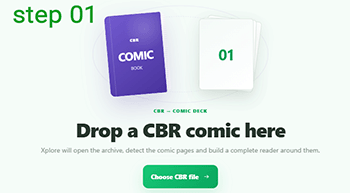
Select the CBR file you want to read
Start by choosing the .cbr comic-book file from your device. This is the archive that contains the individual comic pages.
Let the CBR reader prepare the comic pages
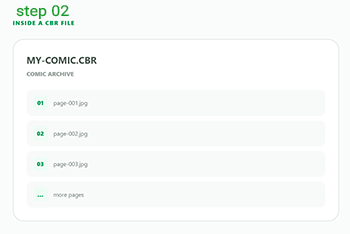
The reader opens the comic archive and prepares the supported page images for viewing. You do not need to extract every image into a separate folder before you can begin reading.
Move through the comic page by page
Navigate through the available comic pages in order. This makes the tool useful as both a CBR viewer online and a practical browser-based comic-book reader.
Zoom in when comic artwork or text is too small
Increase the page view when you need a closer look at speech bubbles, lettering, artwork or small visual details. Zooming lets you inspect the page without changing the original comic file.
Navigate and continue reading your comic
Use the reader controls to move backward or forward through the comic. Continue browsing until you reach the page or chapter you want to read.
The CBR reader is part of Xplore File Manager, a collection of focused browser tools for opening, viewing, converting and working with file formats without turning simple file tasks into complicated workflows.
What is a CBR file?
CBR is a digital comic-book archive format. A typical CBR file contains a collection of comic page images packaged inside a RAR-based archive and presented with the .cbr extension.
The important part for a reader is the page sequence. Comic-reader software opens the archive, identifies the images and displays them in the intended order so the archive behaves like a digital comic book instead of a normal collection of files.
Browse, zoom and navigate CBR comic pages
Reading a comic archive involves more than simply proving that the file can be opened. You need a usable way to move through the pages and inspect the artwork.
Page navigation
Move between previous and next pages as you work through the comic in sequence.
Comic page browsing
Inspect the available pages and move to the part of the comic you want to continue reading.
Zoom controls
Enlarge pages when speech bubbles, lettering or artwork need a closer look.
Browser reading
Open and read the comic from a web interface instead of installing another dedicated reader just for a CBR file.
From CBR archive to readable comic pages
A CBR file may look like one file in your folder, but a comic reader treats it as a sequence of page images. That is why opening the file in a dedicated CBR reader feels different from viewing an ordinary RAR archive.
Why open a CBR file online?
Read a downloaded comic
Open a CBR comic you already have without setting up another application simply to view its pages.
Check what is inside a CBR
Quickly confirm that the archive contains the comic pages you expected and inspect their order.
Jump through comic pages
Browse backward and forward rather than manually opening individual image files from an extracted folder.
Zoom into comic artwork
Enlarge pages when small dialogue, captions or illustrated details are difficult to see at the default size.
CBR is related to RAR, but the reading experience is different
CBR files use a RAR-style archive structure to package comic page images. A general archive viewer focuses on filenames and folders, while a CBR comic reader focuses on displaying those images as an ordered sequence of pages.
What is the difference between CBR and CBZ?
Both formats are commonly used for digital comic books. The main difference is the archive format used to package the comic pages.
| Feature | CBR | CBZ |
|---|---|---|
| Typical purpose | Digital comic archive | Digital comic archive |
| Archive family | RAR-based | ZIP-based |
| Common extension | .cbr | .cbz |
| Typical contents | Ordered comic page images | Ordered comic page images |
| Best way to use it | Open with a CBR-compatible comic reader | Open with a CBZ-compatible comic reader |
Changing a filename does not magically rebuild the comic archive
Extensions help software identify how a file should be handled, but simply changing characters at the end of a filename is not the same as converting or rebuilding the underlying archive. Use a reader that understands the actual comic-book format.
Questions about opening and reading CBR files online
How can I open a CBR file online?
Choose the CBR comic file in the reader above. Once its comic pages are available, use the reader controls to browse, zoom and navigate through the archive.
Can I read CBR files without installing software?
Yes. This CBR reader is designed to let you open and read supported CBR comic archives through the browser interface.
Is the CBR reader free?
The CBR reader is available as a free online tool and does not require you to create an account before using it.
What does CBR stand for?
CBR is commonly associated with Comic Book RAR. It is used for comic-book archives whose pages are typically stored as ordered image files inside a RAR-based container.
Can I zoom in while reading a CBR comic?
Yes. Use the available zoom controls when you need a closer view of artwork, captions or small text on the comic page.
Can I move between pages in the CBR reader?
Yes. Navigation controls let you move through the available comic pages rather than opening each image manually.
What is the difference between a CBR reader and a RAR viewer?
A RAR viewer is primarily designed to inspect archive files and folders. A CBR reader interprets the image files inside a comic-book archive as ordered pages and presents them for reading.
Is CBR the same as CBZ?
They serve a similar purpose but use different archive families. CBR is generally RAR-based, while CBZ is ZIP-based.
Can I open manga saved as a CBR file?
If the manga is stored as a supported CBR comic archive, it can be opened like other CBR comic books and viewed page by page.
Do I need to extract the comic before reading it?
No manual extraction is required for normal reading. The purpose of the reader is to present the supported comic pages from the CBR archive directly in a reading interface.
Start reading your CBR comic online
Choose a CBR archive, open the comic pages and use the navigation and zoom controls to read it directly from your browser.