Find duplicate files inside a ZIP. Even when the names are completely different.
Duplicate files have a habit of hiding in plain sight. One copy may be inside a backup folder, another may have been renamed, and a third may look unrelated until you compare the actual file contents.
Xplore's Duplicate File Finder looks inside your ZIP and groups files that are exact content matches. It does not assume two files are duplicates just because they share a name or happen to have the same size.
How to use the Duplicate File Finder
You do not need to select comparison rules or manually inspect every folder. Add the ZIP and Xplore handles the duplicate scan automatically.
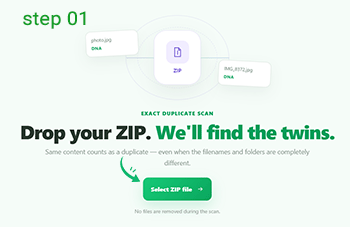
Choose the ZIP file you want to check
Drag the archive onto the tool or click Select ZIP file.
Before scanning begins, Xplore checks that the selected file
really has a recognizable ZIP signature. A file is not treated
as a valid archive simply because its filename ends in
.zip.
Nothing is deleted at this stage. The first job is simply to understand what's inside the archive.
Xplore rules out files that cannot be duplicates
Two files with different byte sizes cannot be exact copies of each other.
Xplore uses that fact as the first filter. Files are grouped by size, and files whose size is unique inside the archive do not need to go through the more expensive content-comparison stage.
This keeps the scan focused on files that actually have a chance of being duplicates.
Candidate files are compared by content
Filename matching alone is unreliable. A duplicate may have
been renamed from photo.jpg to
final-image-2.jpg, while two unrelated files could
accidentally share the same filename.
Xplore reads the candidate files and creates a content fingerprint for each one. In browsers with Web Crypto support, the scanner uses SHA-256 for this stage.
Files whose fingerprints differ are immediately separated.
Matching candidates are verified byte by byte
A matching fingerprint is a strong signal, but Xplore takes the scan one step further before displaying an exact duplicate group.
Files that survive the previous checks are compared byte by byte. Only files whose actual data matches are placed together as exact duplicates.
That means the result is about identical file contents — not filenames that merely look similar.
Review each duplicate file group
Exact matches are grouped together so you can see every path where the same file appears inside the ZIP.
This is especially useful when duplicate copies have different names or are buried in different folders.
Xplore also shows the size of each file and the amount of duplicate data represented by the extra copies.
Search through duplicate file paths
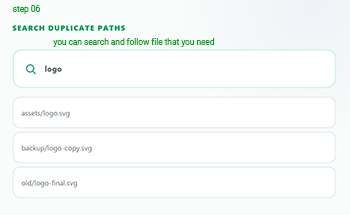
Large archives can contain dozens of duplicate groups, so you do not need to scroll through every result.
Use the search field to look for a filename, folder, extension or another piece of an archive path.
Results are also paginated when needed, keeping the duplicate report manageable even when the ZIP contains a large number of repeated files.
Choose which copy should stay
You do not need to make this decision just to use the Duplicate File Finder. The scan works independently of cleanup.
If you decide to create a duplicate-free ZIP, Xplore automatically marks one file in every duplicate group as KEEP.
If another path is more important, click Keep this beside that copy before rebuilding the archive.
Create a duplicate-free ZIP if you want one
Finding duplicates and deleting duplicates are deliberately separate actions.
When you select Create duplicate-free ZIP, Xplore keeps the selected file from each exact-match group, removes the other copies from the rebuilt archive and produces a separate ZIP.
Your original ZIP is not overwritten.
Download the duplicate report or cleaned ZIP
If you only needed to identify repeated files, download the duplicate report and leave the archive unchanged.
If you rebuilt the archive, Xplore shows the actual original ZIP size and final ZIP size before you download the new file.
That distinction matters: duplicate data inside the archive is not automatically equal to the number of bytes the compressed ZIP will shrink by.

What is a Duplicate File Finder?
A Duplicate File Finder identifies files that appear more than once in a collection.
The important question is how the tool decides what “duplicate” means.
Some comparisons can be based on filenames, timestamps or sizes. Those properties can help narrow a search, but they do not prove that two files contain identical data.
Xplore's ZIP duplicate finder is designed for exact duplicates: files whose contents are identical even if their names and folder locations differ.
Can a Duplicate File Finder find renamed files?
Yes — if duplicate detection is based on file contents rather than filenames.
Renaming a file changes its name, not necessarily the data stored
inside it. That's why photo.jpg and
IMG_8372.jpg can still be exact duplicates.
Xplore compares candidate contents, allowing renamed copies in completely different ZIP folders to appear in the same duplicate group.
Are files with the same size always duplicates?
No.
Two unrelated files can have exactly the same byte size. That's why size is useful as a fast first filter, but not as the final duplicate test.
Xplore uses size to reduce unnecessary work, then continues with content fingerprinting and exact verification before showing a confirmed match.
Exact duplicate files are not the same as similar files
This distinction prevents a lot of dangerous cleanup mistakes.
Same underlying file data
A renamed copy of the same PDF, image, document or other file can qualify as an exact duplicate.
Looks related, but data differs
Two photos of the same scene, two resized images or two edited versions of one document are not exact duplicates if their underlying bytes differ.
How does Xplore find duplicate files?
Instead of fully processing every file immediately, the scanner works in stages.
Each stage removes files that no longer need comparison, allowing the expensive checks to focus on the most likely matches.
How to remove duplicate files from a ZIP
First run the duplicate scan and review the exact-match groups. Xplore automatically chooses one copy to keep in each group.
If that is the copy you want, no extra configuration is required. If another path should survive, use Keep this beside that file.
Then select Create duplicate-free ZIP. Xplore rebuilds a separate archive without the other selected copies.
Some projects intentionally contain the same file in multiple paths. Exact content proves that the files match; it does not prove that every duplicate path is unnecessary.
How much space can duplicate files waste inside a ZIP?
Xplore reports the amount of uncompressed file content represented by extra exact copies as Duplicate Data.
That number is useful for understanding how much repeated content exists, but it should not be confused with guaranteed ZIP savings.
ZIP compression, file types and archive structure all influence the final compressed size. That's why Xplore measures the actual before-and-after ZIP sizes only after the duplicate-free archive has been built.
When is a Duplicate File Finder useful?
ZIP backup archives
Find files copied into multiple backup folders under different names or paths.
Image collections
Catch exact copies of the same image even when a duplicate was renamed.
Website and code archives
Inspect repeated assets, libraries and files before deciding whether any paths are safe to remove.
Collected file packages
Identify repeated PDFs, documents, media and other exact copies inside a large archive.
Duplicate File Finder vs ZIP Cleaner
Both inspect ZIP archives, but they are looking for completely different problems.
Finds repeated file content
Use it when you suspect the same photo, document, asset or other file appears more than once inside the archive.
Compare → verify → groupFinds common archive clutter
Use it for files such as macOS metadata, Windows thumbnail caches and other recognized unwanted ZIP entries.
Scan → clean → rebuildWhat this Duplicate File Finder does — and doesn't do
Knowing the difference keeps the results useful and avoids unrealistic expectations.
Renamed copies can still match when their underlying data is identical.
It is not a whole-computer duplicate scanner and cannot inspect files you never selected.
A resized, recompressed or edited image is different file data even when the picture looks almost identical.
The same content may intentionally exist at multiple paths, which is why archive cleanup is a separate optional action.
Find duplicate files without uploading the ZIP for analysis
This tool is designed to inspect and compare the selected ZIP archive locally in your browser rather than intentionally sending the archive to Xplore's server for duplicate analysis.
Duplicate File Finder is one of the archive tools available on Xplore File Manager , alongside tools for viewing, extracting, cleaning and converting common file formats.
Frequently asked questions about duplicate files
What is a Duplicate File Finder?
A Duplicate File Finder searches a collection for files that appear more than once. Xplore focuses on exact duplicate content inside a selected ZIP archive rather than relying only on filenames.
How do I find duplicate files inside a ZIP?
Select the ZIP and wait for Xplore to scan it. Files are filtered by size, likely candidates are compared by content, and confirmed exact matches are displayed together in duplicate groups.
Can it find duplicates with different filenames?
Yes. Two files can have completely different names and still appear in the same group when their actual file data is identical.
Does the same filename mean two files are duplicates?
No. Two files can share a filename while containing different data. Xplore does not use filename equality as proof of an exact duplicate.
Are files with the same size always duplicates?
No. Size is only an efficient first filter. Files that have the same size still need their contents compared before they can be considered exact duplicates.
Does the Duplicate File Finder use SHA-256?
When the browser provides the Web Crypto digest API, Xplore uses SHA-256 to fingerprint candidate contents. Matching candidates are then verified against the actual file bytes before being treated as exact duplicates.
Can I remove duplicate files from the ZIP?
Yes. After reviewing the groups, select Create duplicate-free ZIP. Xplore keeps one chosen copy from every exact group and excludes the remaining selected copies when rebuilding a separate ZIP.
How does Xplore decide which duplicate file to keep?
The tool automatically selects a keeper so you do not have to configure every group. If another archive path is more important, use Keep this to change the selected copy before rebuilding.
Will removing duplicate files reduce the ZIP size?
Usually there is less repeated content to store, but the exact change in compressed ZIP size depends on compression and archive structure. Xplore therefore measures the actual new ZIP after rebuilding rather than promising that Duplicate Data equals space saved.
Can it find similar or duplicate photos?
It finds exact copies of image files. It is not a perceptual photo matcher, so resized, recompressed, cropped or edited versions are not treated as exact duplicates when their file data differs.
Can this Duplicate File Finder scan my whole computer?
No. This specific tool is designed to search inside the ZIP archive you choose. It does not scan your hard drive or inspect unrelated files on your device.
Can it scan password-protected ZIP files?
Exact duplicate detection requires access to the file contents. The current tool cannot perform the content comparison when the archive entries are encrypted and unavailable to the ZIP engine.
Can I use the Duplicate File Finder with a large ZIP?
Yes, but browser memory and device performance matter. Xplore avoids reading files with unique sizes during the duplicate comparison, but large candidate files still need to be decompressed and compared in memory.
Same file. No matter what somebody named it.
Drop in a ZIP and let Xplore separate real exact duplicates from files that only happen to look similar.
Find duplicate files