Recover the raster images inside a PDF instead of turning every page into a screenshot
There are two very different things people mean by “extract images from PDF.” One method renders each page as a picture. The other looks for the actual raster image objects used inside the document.
This tool does the second. It scans PDF page operations for embedded raster images, decodes the image data and exports readable results as separate PNG files.
Text and vector artwork are deliberately not turned into fake images. If a PDF page is built entirely from text and vector graphics, there may simply be no raster image to extract.
The PDF image extractor is part of Xplore File Manager, where PDF and archive tools are separated by what they actually do rather than treating every conversion as the same operation.
How to extract embedded images from a PDF
Upload one PDF, let the document be scanned page by page, then preview and download only the raster images that are actually found.
Choose the PDF you want to scan
Click Choose PDF file or drop the document onto the extractor. Empty files are rejected and the current PDF size limit is 180 MB.
Once loaded, the PDF engine reads the document locally and checks the page count before extraction begins.
The PDF is scanned page by page for actual raster image operations
The current extractor supports documents of up to 500 pages. For each page it reads the PDF operator list and looks for normal image XObjects, repeated image XObjects and inline image objects.
Objects that cannot be decoded are skipped rather than replacing them with a screenshot of the page.
Review the images the PDF actually contained
Each extracted card shows the page number, decoded dimensions and PNG size. Very small objects below 8 × 8 pixels are ignored so tiny technical resources are less likely to clutter the results.
When browser SHA-256 hashing is available, identical PNG results found repeatedly in the document are recognized and only one copy is kept.
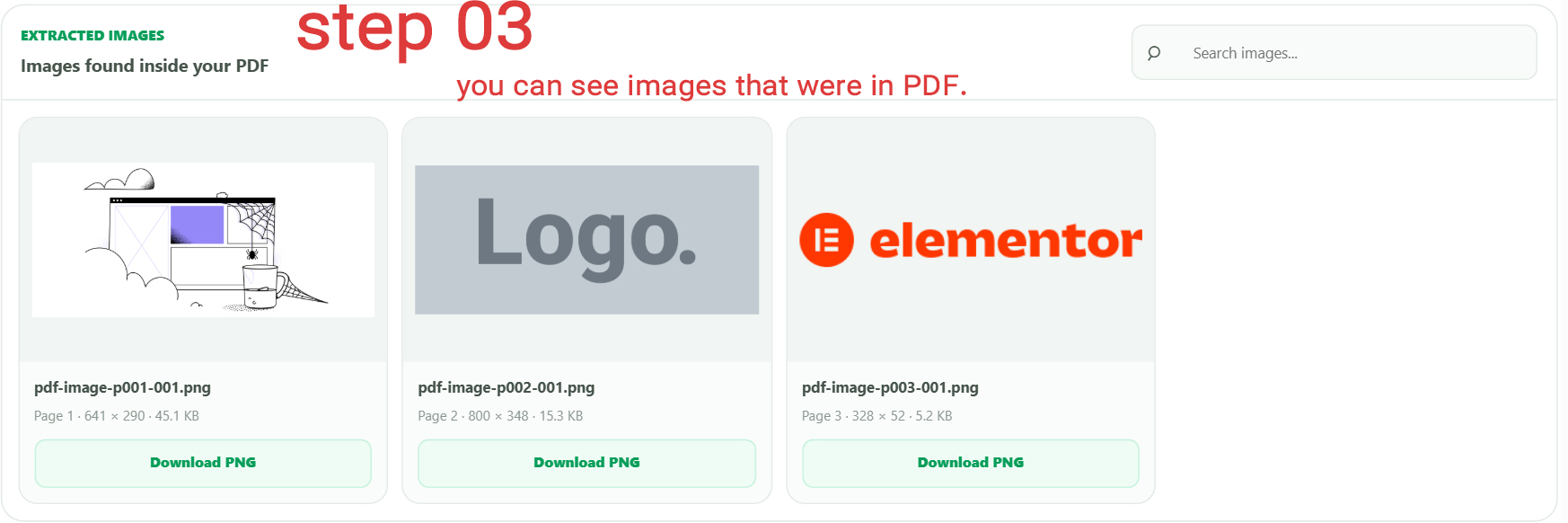
Search by generated image name or PDF page number
Extracted images receive structured names such as
pdf-image-p003-002.png, meaning the second retained
image found on page 3.
Search matches both the generated filename and page number. The grid displays up to the first 600 matching results at a time, which keeps large extractions usable in the browser.
pdf-image-p003-002.png
p003 = page 3
002 = second retained image
Download one PNG or package the extracted images into ZIP
Every result has a Download PNG button for individual extraction.
Choose Download All as ZIP to package the complete extracted set. ZIP creation is currently limited to 550 MB of extracted PNG data.
If your source is named catalog.pdf, the batch
archive is named catalog-images.zip.
This is not the same as converting PDF pages to JPG or PNG
Page rendering combines everything visible on a page—text, vector graphics, backgrounds and raster images—into one flattened picture.
This extractor instead looks for raster image objects referenced by the PDF page. That is useful when the photograph, scan, logo or other bitmap itself is what you want to recover.
The result is a decoded PNG, not necessarily the original compressed image stream
The PDF engine exposes the image pixels, which are then drawn onto a browser canvas and exported as PNG. That means an image originally stored internally using another PDF image encoding is delivered here as a PNG representation of the decoded raster image rather than as a byte-for-byte copy of its original compressed stream.
A reused PDF image does not always need to appear ten times in your download
Some documents reference the same logo, background or graphic from many pages. After an image is converted to PNG, the tool can calculate a SHA-256 digest and use it to skip a byte-identical PNG that has already been retained.
This duplicate check depends on the browser's Web Crypto hashing support. It is intended to reduce repeated identical outputs, not to decide whether two visually similar images are the same picture.
Not every visible graphic in a PDF is an embedded raster image
PDF text stays text
The extractor does not rasterize ordinary text just to manufacture an image result.
Paths are not page screenshots
Logos or illustrations drawn as vector PDF instructions are outside this raster-image extraction workflow.
Some internal pixel layouts may be skipped
If an image object cannot be resolved or converted into a supported pixel representation, it is skipped rather than breaking the complete scan.
The scan and the final ZIP have separate browser limits
The selected PDF is read and scanned in the browser
The document bytes are passed to the browser PDF engine, image objects are decoded locally and the resulting PNG blobs are used for previews and downloads. Resetting the tool also releases the temporary image URLs and PDF document state.
Questions about extracting pictures from PDF files
Does this tool convert every PDF page into an image?
No. It scans for raster image objects embedded or referenced inside PDF pages rather than rendering each complete page.
What format are extracted images downloaded in?
Readable raster objects are decoded and exported as PNG files.
Will PDF text be extracted as an image?
No. Text is not intentionally converted into a screenshot by this extractor.
Will vector graphics be extracted?
Not as raster-image results. The tool is specifically scanning for PDF raster image operations.
Why does a PDF show no extracted images even though it looks graphical?
The visible content may be text, vector artwork or another structure rather than readable embedded raster images.
Are repeated images removed?
When browser cryptographic hashing is available, byte-identical extracted PNGs can be detected by SHA-256 and repeated copies are skipped.
What is the maximum PDF size?
The current browser limit is 180 MB.
How many PDF pages can be scanned?
The current document limit is 500 pages.
Can I download all extracted images together?
Yes. Download All as ZIP is available while the extracted PNG data totals no more than 550 MB.
Scan the document for real raster images and download only what was actually found
Open the PDF, inspect the image dimensions and source pages, then save individual PNGs or package the complete result into ZIP.