Turn WebVTT subtitles into a simpler SRT track for players and editors
WebVTT can contain more than subtitle text and timestamps. A VTT file may include cue identifiers, positioning settings, NOTE sections, styling blocks, regions and WebVTT-specific inline markup that does not map directly to standard SRT.
The converter above reads the usable subtitle cues, cleans WebVTT-specific information that should not be written into the SRT, converts timestamp syntax and automatically generates sequential SRT cue numbers.
You can use a VTT file or paste WebVTT text, preview the parsed cues, search the subtitle text and inspect how much VTT-specific data was removed before downloading the result.
This WebVTT converter is part of Xplore File Manager, where conversion tools are built to account for the structural differences between formats instead of only swapping file extensions.
How to convert VTT to SRT online
Load the WebVTT source, let the converter separate usable subtitle cues from VTT-only data and then inspect the cleaned result before downloading it.
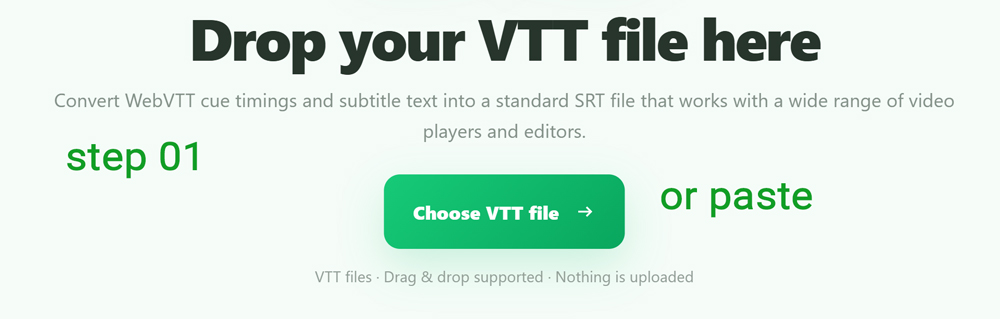
Choose a VTT file or paste WebVTT text
Click Choose VTT file, drag the .vtt subtitle into the converter or paste the WebVTT text directly into the input box.
File input currently supports VTT files up to 25 MB. Pasted WebVTT is processed through the same conversion logic.
WebVTT-specific blocks and cue settings are identified
The parser skips the initial WEBVTT header metadata
and recognizes NOTE, STYLE and REGION blocks as
WebVTT-specific data that should not become ordinary SRT cues.
Extra text after a cue's end timestamp—such as positioning or alignment settings—is also detected and omitted from the SRT timing line.
Review the parsed cues and cleanup report
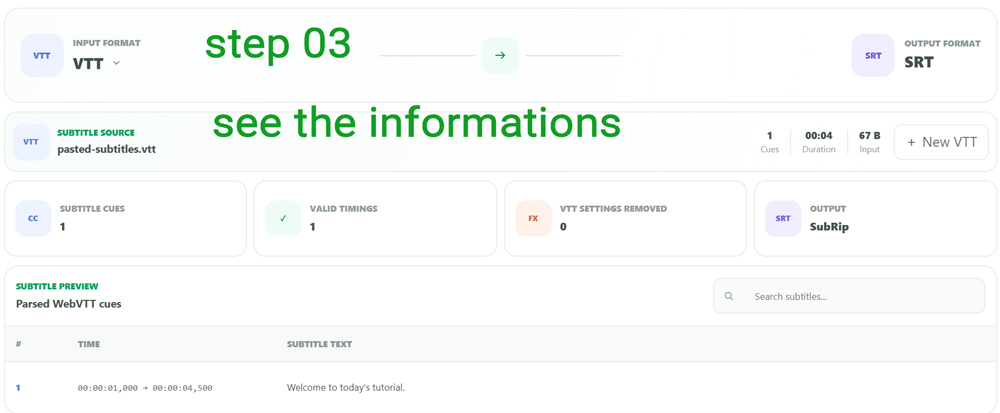
The workspace reports subtitle cue count, valid timings and the number of VTT settings or special blocks that were removed during parsing.
Preview the cue timing and text, then use Search subtitles to find specific dialogue in a larger caption file.
Create numbered SRT cues with comma timestamps
Click Convert to SRT. The converter generates fresh sequence numbers beginning at 1 and writes each parsed cue as an SRT block.
WebVTT timestamps such as
00:00:05.250 become SRT timestamps such as
00:00:05,250.
00:05.250
00:00:05,250
Copy the SRT text or download the subtitle file
The generated SRT is displayed in a readable text area after the conversion completes.
Use Copy SRT to move the result directly into a subtitle editor, or click Download SRT to save the completed file.
What is a VTT file?
VTT usually refers to WebVTT, a timed-text format designed for captions, subtitles and other synchronized text used with web media.
In addition to cue timestamps and text, WebVTT can carry information such as cue positioning, alignment, regions, style blocks, notes and markup that has no direct one-to-one representation in a basic SRT file.
00:00:05.000 --> 00:00:08.000 line:90% align:center
This is a WebVTT subtitle.
Which WebVTT information is removed during this conversion?
SRT has a simpler structure, so WebVTT-only information needs to be separated from the text and timing data that SRT can represent.
Comment blocks
NOTE blocks are recognized as VTT metadata and are not turned into subtitle cues.
WebVTT styling blocks
STYLE blocks are skipped rather than being inserted as visible SRT dialogue.
Region definitions
WebVTT REGION blocks are excluded from the standard SRT result.
Position and alignment data
Settings following the end timestamp are counted as VTT-specific information and left out of the SRT timing line.
<v Alice>Hello</v>
↓
Hello
WebVTT wrapper markup can be removed while the subtitle words remain
The current cue cleaner strips WebVTT inline timestamps and wrapper tags used for voices, WebVTT classes, language annotations and ruby-related markup.
The text contained inside those wrappers is retained, which prevents markup intended for WebVTT rendering from appearing as ordinary text in the SRT output.
Converting to SRT intentionally simplifies some WebVTT features
| Feature | WebVTT source | SRT result |
|---|---|---|
| Header | WEBVTT | Removed |
| Timestamp milliseconds | 00:00:05.250 |
00:00:05,250 |
| Cue numbers | Optional | Generated automatically |
| Cue settings | May contain position/alignment data | Removed |
| NOTE / STYLE / REGION | Supported WebVTT blocks | Skipped |
The parser handles VTT timings with or without an explicit hour field
A WebVTT cue may use a timestamp such as
00:05.500 for five and a half seconds or a full timestamp
such as 01:02:05.500.
Parsed times are converted into the full SRT time representation when the result is generated.
Subtitle text is normalized before WebVTT parsing begins
Primary decoding
Selected VTT files are first decoded as UTF-8 with invalid UTF-8 treated as a decoding failure.
Windows-1252 fallback
If strict UTF-8 decoding fails, the reader attempts Windows-1252 before using the browser's default text decoder.
Normalized subtitle text
A leading BOM is removed and CRLF or CR line endings are normalized before cues are parsed.
Your WebVTT is converted directly in the browser
The selected file or pasted subtitle text is parsed by the page, WebVTT-specific data is cleaned in browser memory and the resulting SRT is generated locally for copying or download.
Questions about converting WebVTT subtitles to SRT
How do I convert VTT to SRT online?
Load a .vtt file or paste WebVTT text, review the parsed cues and cleanup information, then click Convert to SRT.
Does VTT to SRT only change dots into commas?
No. The converter also parses cues, skips VTT-specific blocks, removes cue settings, cleans selected inline WebVTT markup and generates SRT cue numbers.
What happens to the WEBVTT header?
The WebVTT header and its header metadata are not written into the generated SRT.
What happens to WebVTT positioning settings?
Text following the parsed end timestamp on a cue timing line is treated as VTT-specific cue settings and omitted from SRT timing.
Are NOTE, STYLE and REGION blocks kept?
No. The current converter counts and skips those WebVTT-specific blocks during conversion.
Will voice tags appear in the SRT?
WebVTT voice wrapper tags are removed while their contained subtitle text is retained.
Are SRT cue numbers created automatically?
Yes. Valid converted cues are sequentially numbered from 1 in the generated SRT.
Can I preview the VTT before converting?
Yes. The workspace displays parsed cue timings and text and provides subtitle search.
What is the VTT file-size limit?
The current file input accepts WebVTT files up to 25 MB.
Can I copy SRT without downloading a file?
Yes. The completed result provides both Copy SRT and Download SRT controls.
Clean the WebVTT-specific data and create a standard SRT
Preview the cues, convert the timestamps and copy or download the finished subtitle file.